Upgrade your Workstation, your way.
Bring performance and security benefits to your operation by upgrading your FLEXCEL NX Workstation and unlocking the full potential of your FLEXCEL NX System. With the right workstation upgrade, you can stay ready for the latest Miraclon innovations, including FLEXCEL Prime Plates and FLEXCEL NX Central Software, while supporting greater efficiency, sustainability and future-ready performance.
Product Marketing Manager, Alex Bonemeyer, looks at why to upgrade and how.
Why do I need to upgrade my workstation?
We continue to advance FLEXCEL NX Technology through new processes, software and media. An up-to-date FLEXCEL NX Workstation helps your fully leverage these innovations, including FLEXCEL Prime Plates and FLEXCEL NX Central Software, while supporting efficiency, sustainability, and future-ready performance. Without the right infrastructure, even the most capable imaging system can be limited by outdated computing performance.
For many customers, a workstation upgrade is not just about replacing aging hardware. It is about maintaining access to the latest Miraclon capabilities and ensuring your platemaking environment is ready for continued improvements.
What options do I have for upgrading?
We offer different upgrade options so you can choose the approach that works best operationally and financially:
- The All-Access Service Plan provides comprehensive support and ongoing access to technology advancements – delivering maximum value and lifecycle predictability.
- The Workstation Renewal Plan ensures your system remains current through a structured, pay-as-you-go approach that eliminates end-of-life uncertainty.
- For customers who prefer capital planning flexibility, a one-time purchase option support future innovations and ensures support.
Each option simplifies the upgrade, protects your investment and gives you access to all the benefits of FLEXCEL NX Central Software.
Contact your Miraclon representative or Customer Care for more information on the best option for you.
How do I know if my workstation needs upgrading?
Type ‘System Information’ into the search box of your device to view your system model and operating system. If your workstation is approaching five years of service, running Windows Server 2012 or an earlier operating system, or operating on a T310, T320 or T330 PowerEdge platform, it is strongly recommended that you explore upgrade options before support limitations or security vulnerabilities impact production.
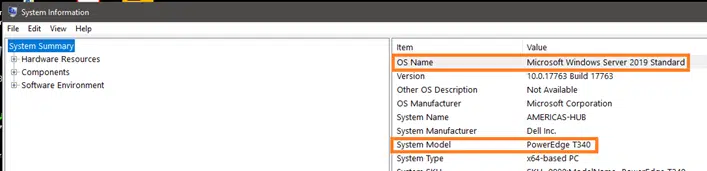
In practical terms, if your current setup is limiting access to newer software, slowing the processing of demanding files, or approaching the end of supported hardware or operating system life, it is time to review your FLEXCEL NX Workstation upgrade path.
Should I upgrade my system independently?
Purchasing a replacement workstation directly from a manufacturer, such as Dell, or using off-the-shelf hardware often introduces greater costs and complexity over time.
A non-approved device will not include our customized software configuration, validated hardware components, or full system testing prior to deployment. As a result, it cannot be supported by Miraclon. Future product additions, software updates, and firmware rollouts may require field retrofitting, additional hardware sourcing, and extended service time – increasing downtime and expenses.
A Miraclon-approved workstation ensures compatibility, validation, and long-term serviceability from Day One.
How will a workstation upgrade affect my operations?
Upgrading delivers faster processing for demanding files, improved system stability, and fewer disruptions. Instead of reacting to performance issues, you gain more predictable and controlled production.
Conversely, aging hardware can introduce processing delays, instability, and unexpected interruptions – often at the most inconvenient times. Like most servers, the FLEXCEL NX Workstation has a lifecycle of approximately five years. After that, manufacturer support ends and performance risks increase. What may appear to be a functioning workstation can quietly become a liability – unable to support the latest updates, security patches or remote diagnostics tools.
Are there security risks from not upgrading?
Yes, unsupported operating systems present genuine cyber security risks. Microsoft no longer supports Windows Servers 2012, so systems running this operating system or earlier versions, no longer receive security updates or patches, increasing vulnerability to ransomware, data breaches and compliance exposure.
By upgrading your workstation, you’re strengthening the protection for business-critical data while enabling secure remote service and diagnostic tools. It also ensures Miraclon can continue to provide full support without compatibility limitations.
Ready to upgrade?
If you’re ready to upgrade your platemaking and print performance, and safeguard your data, you can review your workstation status and explore the upgrade options by contacting your local Miraclon representative or by reaching out to Customer Care.

Alex says:
“The typical lifespan of these servers is five years, after which they reach the edge of their life and are no longer supported by the manufacturer. But upgrading is fast and easy.”